yum update iproute
yum update ss
brew services list
brew services restart nginx
/opt/homebrew/opt/nginx/bin/nginx -g daemon off;

brew install shivammathur/php/php@7.4
brew reinstall php@7.4

sudo lsof -i -n -P|grep php-fpm

brew services start php@8.2
แก้ไขไฟล์ opt/homebrew/etc/nginx/nginx.conf
    location / {
        root /path/to/www;
        try_files $uri $uri/ /index.php?$uri&$args;
    }
Install multiple PHP version
brew tap shivammathur/php
เลือกมาสักเวอร์ชั่น
brew install shivammathur/php/php@5.6
brew install shivammathur/php/php@7.0
brew install shivammathur/php/php@7.1
brew install shivammathur/php/php@7.2
brew install shivammathur/php/php@7.3
brew install shivammathur/php/php@7.4
brew install shivammathur/php/php@8.0
brew install shivammathur/php/php@8.1
brew install shivammathur/php/php@8.2
brew install shivammathur/php/php@8.3
Mac M1 : Config file อยู่ที่
/opt/homebrew/etc/php/7.0/php.ini
/opt/homebrew/etc/php/7.1/php.ini
/opt/homebrew/etc/php/7.2/php.ini
/opt/homebrew/etc/php/7.3/php.ini
/opt/homebrew/etc/php/7.4/php.ini
/opt/homebrew/etc/php/8.0/php.ini
/opt/homebrew/etc/php/8.1/php.ini
/opt/homebrew/etc/php/8.2/php.ini
/opt/homebrew/etc/php/8.3/php.ini
แก้ไขไฟล์ php.ini ที่ /opt/homebrew/etc/php/8.0/php-fpm.d/www.conf เปลี่ยน port จาก 9000 เป็น 9080
restart php
brew services start php@8.0
Problem
1.Can't upload jpg/pdf
- Remove folder /opt/homebrew/var/run/nginx
- Create folder /opt/homebrew/var/run/nginx again with user in nginx
ที่มา - Introduction to NGINX
- Install Nginx & Multiple PHP Versions on macOS 12 Monterey
Step 1 – Installing the Nginx Web Server
sudo apt update sudo apt upgradesudo apt install nginx
sudo nginx -t sudo systemctl restart nginx sudo systemctl reload nginx sudo service nginx restart sudo service nginx reload
หากมีการติดตั้ง apache2 ไว้ก่อน สามารถถอนการติดตั้งด้วย
apt-get purge apache2
apt-get autoremove
Step 2 – Installing MySQL to Manage Site Data
sudo apt install mysql-server
sudo mysqlsecureinstallation
sudo mysql
mysql> ALTER USER 'root'@'localhost' IDENTIFIED WITH mysqlnativepassword BY 'password';
mysql> FLUSH PRIVILEGES;
ถ้าต้องการถอด php ออก ด้วย
sudo apt-get purge php7.*
sudo apt-get autoclean
sudo apt-get autoremove
Step 3 – Installing PHP and Configuring Nginx to Use the PHP Processor
sudo add-apt-repository universe sudo apt install php-fpm php-mysql sudo apt install php8.1-mbstring sudo apt install php8.1-gdphp --version which php whereis php
sudo nano /etc/nginx/sites-available/your_domain
/etc/nginx/sites-available/yourdomain
name your_domain;
server {
        listen 80;
        root /var/www/html;
        index index.php index.html index.htm index.nginx-debian.html;
        server
    location / {
           try_files $uri $uri/ /index.php?$uri&$args;
           # try_files $uri $uri/ =404;
    }

    location ~ \.php$ {
            include snippets/fastcgi-php.conf;
            fastcgi_pass unix:/var/run/php/php7.2-fpm.sock;
    }

    location ~ /\.ht {
            deny all;
    }
}
Step 4 - How To Secure Nginx with Let's Encrypt on Ubuntu 22.04
sudo apt remove certbot
sudo snap install core; sudo snap refresh core
sudo snap install --classic certbot
sudo ln -s /snap/bin/certbot /usr/bin/certbot
sudo certbot
ติดตั้ง SSL Certificate Filde วิธีการติดตั้ง SSL Certificate บน Nginx Server
Ubuntu create user account commands
sudo adduser name
กรณีการอัพเกรดจาก Apache มีขั้นตอนของการตรวจสอบ และ ถอดโปรแกรม
uname -a
Linux alumni 5.4.0-167-generic <a class="hashtag" href="/tags/184">#184</a>-Ubuntu SMP Tue Oct 31 09:21:49 UTC 2023 x86_64 x86_64 x86_64 GNU/Linux

lsb_release -a
No LSB modules are available.
Distributor ID: Ubuntu
Description:    Ubuntu 20.04.1 LTS
Release:    20.04

apachectl -v
Server version: Apache/2.4.41 (Ubuntu)
Server built:   2023-10-26T13:54:09

php -v
PHP 7.4.3-4ubuntu2.20 (cli) (built: Feb 21 2024 13:54:34) ( NTS )
Copyright (c) The PHP Group
Zend Engine v3.4.0, Copyright (c) Zend Technologies
    with Zend OPcache v7.4.3-4ubuntu2.20, Copyright (c), by Zend Technologies

mysql --version
mysql  Ver 15.1 Distrib 10.3.39-MariaDB, for debian-linux-gnu (x86_64) using readline 5.2

<a class="hashtag" href="/tags/apt">#apt</a> update
<a class="hashtag" href="/tags/apt">#apt</a> list --upgradable<br />
<br />
<br />
add-apt-repository ppa:ondrej/apache2
apt update
apt upgrade

do-release-upgrade

ssh recovery port 1022
กำลังศึกษาวิธีการจัดการ light/dark mode เพิ่งเริ่ม เดี๋ยวค่อยกลับมาเขียนต่อ
keyword: force for darkmode using prefers-color-scheme: dark
ที่มา
กำลังเปลี่ยน Class MyDb() ของเดิมเป็น Class SoftganzDB() ของใหม่ และเปลี่ยนมาใช้ PDO แทน mysqli
ที่มา
เดิมเคยเก็บโดยการแปลงด้วยคำสั่ง jsonencode แต่มักจะเกิดปัญหาเมื่อมีอักขระบางตัวหรือการขึ้นบรรทัดใหม่ ซึ่งจะทำให้ไม่สามารถแปลงกลับด้วยคำสั่ง jsondecode
แต่....
MySQL version 5.7.8 ได้เพิ่ม JSON data type ให้แล้ว (แม้ว่าเมื่อเลือกเป็น JSON data type แล้ว MySQL ก็จะเก็บเป็น longtext type ก็ตาม)
และมีคำสั่งเฉพาะในการจัดการกับข้อมูล เช่น
JSONOBJECT,
JSONARRAY, JSONMERGEPRESERVE, JSONMERGEPATCH, JSONTYPE, JSONEXTRACT, JSONINSERT, JSONREPLACE, JSONSET, JSONREMOVE
ลองดูรายละเอียดได้จาก How To Work with JSON in MySQL
ที่มา
Intro: / A E / A D / A E / B A /
    A              E     F#m       A
วันเวลาหมุนเปลี่ยนเวียนไป สุขสดใสไม่เคยเดินตาม
    A              E      F#m        A
วันเวลาหมุนเปลี่ยนโมงยาม ต่างทับถมแต่ความทุกข์ทน
    A           E        F#m        E
ในเวลาหนาวเปลี่ยวกมล เอาความฝันของฉันต่อเติม
    A          F#m  D          A       E     A
ตามเวลาได้มาช่วยเสริม สานเป็นความสดใส ไม่มากมายให้แค่มี
Instru / A E / B7 A /
      A            E       F#m       A
มีความหวังเป็นทางสร้างธรรม มีความช้ำเป็นกำลังใจ
       A       E        F#m       A
เอาความจริงที่แตกสลาย ใส่เบ้าหลอมรวมเป็นพลัง
        A           E       F#m       E
เอาความเลวที่เกาะเกรอะกรัง กลั่นมันทิ้งกินเป็นตะกอน
     A         F#m       D        A       E     A
เอาน้ำตาที่เคยเปียกหมอน ไปราดรดร่างคนรุ่มร้อน ให้ชุ่มเย็น ไม่ย่ำยี
   D      E       A      F#m  D     E    A         F#m
* ฝันนั้นล่องลอย ดุจหิ่งห้อยแสงริบหรี่   ฝันนั้นยังมีสิ่งสดใสในคืนเดือนดับ
 D      E       A    F#m   D        E      A      F#m
รอตะวันรุ่งราง จะลาลับไม่รบกวน ยามคุณร้าวรัญจวน ก็จะหวนแสงหิ่งห้อย
 D      E         A
ร้อยเรื่องราวในคืนข้างแรม
Instru / A E / F#m A / A E / F#m E / A F#m / D A / B7 A /
( * , * )
Outro / A E / A D / A E / B7 A /
[Intro] / G / G / Bm / G / A Bm / Bm / Bm /
Bm                        D          Bm
ไกลโอ้ไกลจากโพ้นขอบฟ้า เราจากมาด้วยการก้าวย่าง
       D         Bm        G         A7
จากกลิ่นฟางรอยยิ้มเจ้าเอย ใครเล่าเคย ใครเล่าเคย
     D         Bm
พี่น้องเอ๋ย จะเล่าให้ฟัง
[Instru] / G / Bm / Bm / Bm / D / Bm / Bm /
     Bm
ตามทิวเขาที่ยาวเหยียดฟ้า ตามหมู่ปลาลำธารใสสด
     D       Bm        G      A7
ตามหมู่มดที่รังเลิศงาม ไปจากหลัง ใจฝากฝัง
      D
ฝากเจ้าไว้ ในแผ่นดิน
[Instru] / Bm / (6 Times)
      Bm                                    D        Bm
ดินเคยนอนสะท้อนอุ่นกาย มองยอดไม้เมื่อยามแรกผลิ ผลิกิ่งรวงเป็นพวงพุ่มไม้
                                       D           Bm
น้ำที่ไหลหลั่งลงจากดอย ใจเจ้าลอยไปสู่ท้องทุ่ง มุ่งสู่เมืองเฟื่องฟุ้งแปลกตา
                                                 D       Bm
เจ้าเคยยิ้มเคยแย้มเบิกบาน สนุกสนานท่ามกลางผองเพื่อน เคยพูดเตือนและสนทนา
                                  D         Bm
เจ้าเคยฝันถึงวันที่ดี มาบัดนี้มิอาจพบหน้า ดูใกล้ตา แต่แล้วไกลตีน
       G         A7          D       Bm
แผ่นดินที่หอม แผ่นดินที่ตรอม จะกอดเจ้าไว้ ยังไออุ่นกัน
                                    D        Bm
รักเจ้าไว้ยังไออุ่นกัน ฝันและฝันให้ไกลที่สุด เจ้ามนุษย์จะหวังสิ่งใด
                                    D        Bm
รักเจ้าไว้ยังไออุ่นกัน ฝันและฝันให้ไกลที่สุด เจ้ามนุษย์จะหวังสิ่งใด
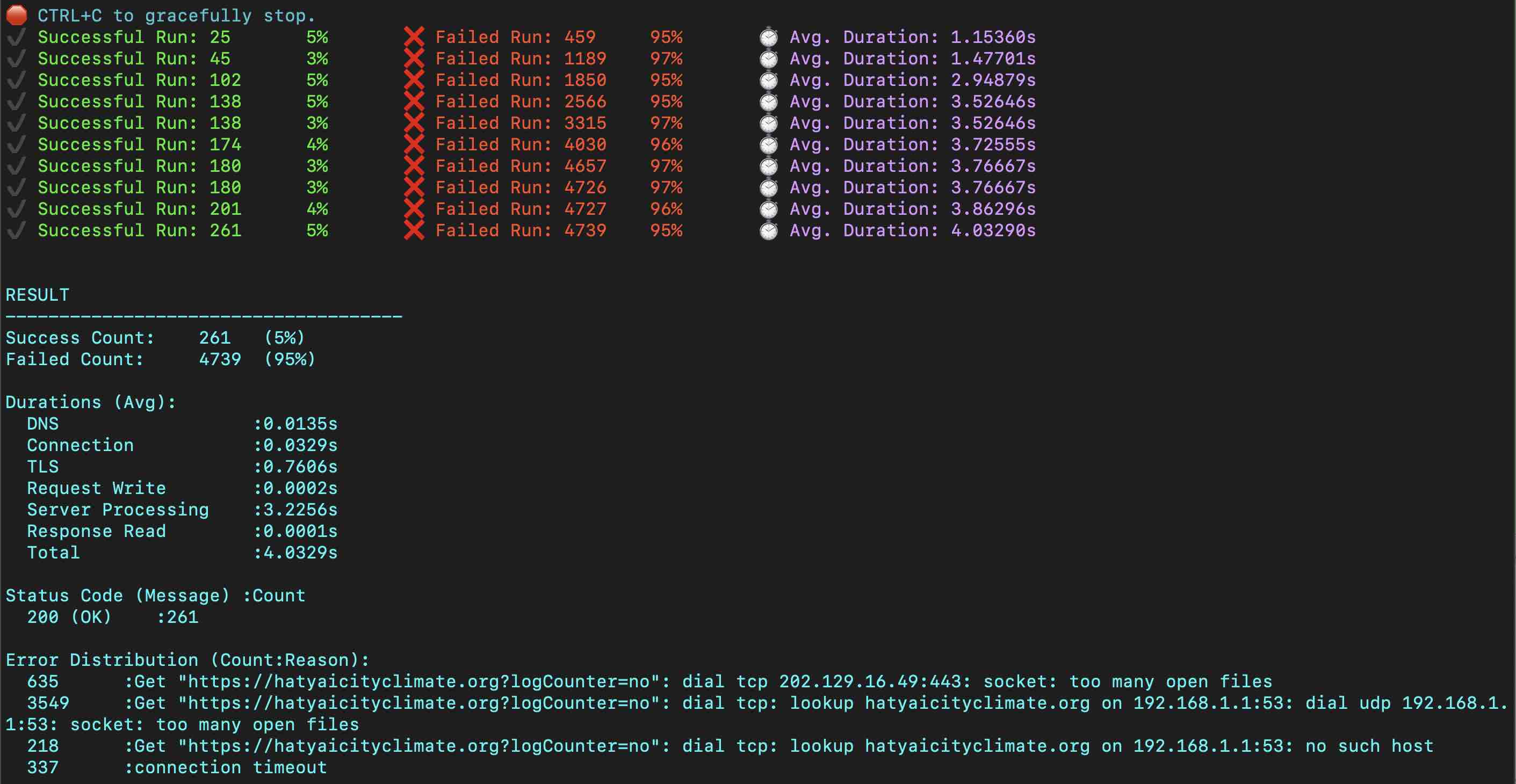
ทดลองทำ Load Test กับ server
ddosify -t "http://localhost/seti/softganz.com?logCounter=no" -m GET -n 5000
ผล ไม่ผ่าน
RESULT
Success Count: 261 (5%)
Failed Count: 4739 (95%)
 (capo 1ST FRET)
               Am      E7             Am
When you're down and troubled and you need a helping hand,
    Dm          G7               C     E7   Am
and nothing, oh, nothing is going right,
Am                    E7          Am
close your eyes and think of me and soon I will be there
   Dm         Em                  Dm     G7
to brighten up even your darkest night.

           C                        F
You just call out my name,  and you know wherever I am,
             C                G7   G
I'll come running to see you again.
C                                  F                   Am
Winter, spring, summer, or fall,  all you got to do is call
         F    Em          Dm    G7
and I'll be there,     yeah, yeah, yeah.

           C
You've got a friend.

Am           E7            Am
If the sky above you should turn dark and full of clouds,
         Dm        G7                     C    E7    Am
and that old north wind should begin to blow,
Am                 E7     Am
keep your head together and call my name out loud.
Dm             Em                Dm      G7
Soon I'll be knocking upon your door.

REPAEAT CHORUS :
*         Bb                     F
Hey ain't it good to know that you've got a friend when

C                           F                    Fm7
people can be so cold.     They'll hurt you and desert you.
              Am7                       D7
Well, they'll take your soul if you let them.
                  G7
Oh yeah, but don't you let them.
             C                      F
You just call out my name,  and you know wherever I am,
      C                     G7   G
I'll come running to see you again.
C                                  F

                Am
Winter, spring, summer, or fall,  all you got to do is call
         F      Em     Dm     G7
and I'll be there, yes I will.
               C       F            C
You've got a friend.  You've got a friend.
F                                   C
Ain't it good to know you've got a friend?
              C                           G
F                                         C
Ain't it good to know you've got a friend?
F                               C
Oh, yeah, yeah.  You've got a friend.